Monday, December 30, 2013

Which radio station really has the best variety of songs?


Listening to the radio


Years ago, I listened to the good ol' FM radio, and I pretty much had something playing 24x7 (as long as nobody complained about the music). Although, for some reason my "preferred" stations would always end up becoming acquired by another entity/competitor/whatever - like WLOL and The Edge.


Eventually, I grew tired of the seemingly "limited music variety" that was available by the usual radio stations, so I usually prefer to stream something (still filled with commercials) from Spotify, Pandora, and other sources, where I have a little more control over the variety (although even these providers seem limited in their breadth of variety)

Radio Tower
Since it's completely unfair to blatantly claim that the local terrestrial FM radio stations have a limited/repetitive song catalog, I figured I'd "be scientific" and actually collect data on what the stations are playing, and then visualize/graph the information to see what would show up. 

There are probably better ways to spot trends within data, but I prefer to view (and explain) things using visual means, so my approach is to simply present things, and "just see what happens".


Accumulating the data


I figured it'd be easy to gather the data, since most of the local station's web sites provide the "currently playing" song data, and if sites like tunein.com and radiosearchengine.com can provide the information, I should be able to figure it out too.

I started with 93X (KXXR), which seems to be the only "current rock-music station" in the area (yeah, pretty sad). I went to their website, and then fired up the developer tools to identify the means used to retrieve the "currently playing" song information. At the time (Dec 2013), it uses a jQuery JSONP call to retrieve the information, which is a decent workaround if the data provider doesn't support CORS

All I had to do was visit the station's website, clear the "Network" tab after everything had finished loading, and then wait for the next song to start. Eventually, entries would appear as the web page would poll the currently playing song, and then update things when needed.

I coded up a simple bit of JavaScript code using Node's http get routine and configured it to poll the website every so often. After a little while, my data collector stopped working. I pointed a real web browser at the station's website to see what the problem was, and I was presented with a "You've been blacklisted" type of message from the station's hosting provider!  I thought it was a tad ironic that a station that presents itself with a "bad-assed barely legal" veneer image had declared that I was too deviant to be allowed access to their website's information. 

My first thought was that they're trying to pretend that they can restrict access to that data in the same way that Major League Baseball tried to "copyright" facts and stats in order to deter the Fantasy Baseball leagues. Eventually, I figured out that it was a simple DDOS type of filter, and that all I had to do was make my data requests look "more like a real web browser".

One of the (many) great features in Chrome's Dev Tools is the option "Copy as cURL". After a few days, the blacklisting automatically cleared (or maybe my outgoing IP address changed), and I was able to access the station's site again. I opened Chrome's Dev Tools once again, and this time I copied everything that the original request used.

As I expected, the request was full of header settings, referer (yeah, it's misspelled), and cookies. I slam-dunked most of the pieces within that request into my "defined stations" database/collection, then hooked up the wonderful node-curl npm module, and unleashed my data-collection code upon the information. After a few hours, the data collection seemed stable, and hadn't been blacklisted. Mission accomplished!


Deploying the app


As difficult as all of that coding seems, deploying an app is actually the most difficult part (I keep planning on writing up my thoughts, explanations, and experiences about that topic, but it hasn't happened yet). 

When designing/developing an app, you need to have the end-goal in mind from the beginning, or it's going to be a complete train wreck. As a result, when I started imagining up this experiment, I specifically had NodeJS and MongoDB in mind so that I could deploy/use OpenShift (RedHat) and MongoLab.

The team over at OpenShift have a guide to help get started with a new NodeJS app, although I chose not to use their MongoDB cartridge, and preferred to manage the database myself. I eventually discovered that there's a quickstart guide for using OpenShift and MongoLab together, but I had already had things working - figures.

I personally love the PaaS, which is basically a "more evolved" form of a web-app container (I've been doing Java Apps since 1997). When I started deploying Java apps "to the cloud" years ago, I was disappointed in the amount of "wakeup time" that was required after hitting an app that had "gone to sleep"  (If you're wondering, Google's App Engine seems to have the fastest/best "wakeup time" for Java-based apps, but maybe that will be another "research project" someday).  Anyway, from my experience, NodeJS apps seem to have an extremely quick wakeup/response time (because humans should never have to wait for a computer).

Getting the app deployed was a breeze (due to the straightforward git-based interface used by OpenShift). I eventually coded up a simple REST-based interface so that I could peek on the collected data without having to dive into the MongoDB shell/console.

After a few days, I discovered that there were times where the data stream would contain entries like "Song information not available", which I obviously didn't want to include within my collected data (along with other "glitches" in the data stream). So, it took a few iterations of refinement and data scrubbing/cleansing in order to get a "clean" set of song information. 


Looking at the data from a different view


After a few days of collecting data, and improving the process (which is still ongoing), I wanted to get a better look at what I had accumulated.  I've been wanting to do "more sophisticated" graphs with the D3 library, because everything I've done with D3 thus far was akin to printing simple drinking straws with a Stratasys printer

I had an idea of how I wanted to "see the data", and after lots of searching, I discovered a graph called a "Cluster Dendrogram" with an example, which appears to use a data-protocol similar to Flare.  I updated my NodeJS code to provide a data-feed similar to what the graph expected/used, and had things working pretty easily (which is freakin' amazing, because that almost never happens in real life). 


After a few more iterations (and deployments) to my OpenShift instance, I was able to generate a graph of the songs played in the last 48 hours by the radio station - and as I had guessed, there is a small number of artists/bands that compose a "significant portion" of their song catalog.


The graph seemed interesting enough, but data isn't very meaningful unless you have a baseline or some other means of comparing things. So I used my existing JSON/cURL based collection engine on the websites for KQRS (which is a "classic rock" sister station of KXXR, and thus was pretty easy to set up), and the station KDWB (yeah, I know), which was a bit more challenging due to the way their JSON data feed/response is structured.

After a few more late-evening sessions (after the kids were in bed) of coding, tweaking, and deploying, I was able to obtain more graphs of the song selections for these stations.  

The station KQRS shows a "wide variety" of songs, because each song in the graph is pretty much played just once. 


The station KDWB is on the opposite end of the spectrum (being a more Top 40 type of format), and thus shows a very small number of artists/songs each with a numerous amount of broadcasts within the time period.


If you want to see the entire graphs in real-time, you can find them here:
http://noderadio-panurgy.rhcloud.com/graph.html

March 4, 2014 - deployment update - I've noticed that the RedHat/OpenShift instance tends to go to "sleep" after an unspecified period, which kills the radio station polling. I've also had ongoing issues with the radio station's ISP blocking my app due to suspected "DDoS Activity". So, I tweaked the code and made it work on OpenShift and CloudFoundry, and then deployed the app to a few other PaaS providers:

AppFog (CloudFoundry): AppFog (using AWS): http://noderadio.aws.af.cm
Updated July 1, 2014 - AppFog no longer supports instances on the HP Cloud, moved to AppFog on AWS/East.

IBM BlueMix (CloudFoundry @ SoftLayer): http://noderadio.mybluemix.net/
Updated July 1, 2014 - IBM BlueMix domain names have changed, now that they've officially launched the service.

Yet another update - Nov 27, 2014: Tried out Heroku's integration with DropBox and deployed an instance to their service, which increases the resiliency of the application now that it's running on yet another (free) PaaS:  http://noderadio.herokuapp.com

A nice bonus about this is that it's super easy to "scale wide" and provide capacity (and redundancy) by deploying the same app/code to multiple services.

Conclusion or consensus ?


After watching the graphs evolve, it definitely appears that stations whose format is biased towards the newer music tend to repeat songs more frequently, and thus "have less variety". On the other end of that spectrum are the stations whose format is biased towards classic (or older) songs, and thus can draw upon a wider variety of songs (and hence, less repetition).

So yeah, I basically spent two weeks of evenings and weekends to "prove" something that was pretty much "commonly known". Fortunately, my actual goal was to become more familiar with NodeJS, OpenShift, MongoDB (and its "schemaless nature" - which does not mean that the data isn't  organized), MongoLab, and D3 - and in that regard, the experiment was a huge success.

I guess I'll stick with Spotify, and songs like BT - Skylarking, which is great background music for coding (and I love night-time long-exposure photography). 

Add a comment below if you happen to have a favorite song/artist/station for coding music!

P.S. I finally committed the code out in a GitHub repo: panurgy/noderadio. Check back for updates, or follow me on Twitter

Wednesday, July 10, 2013

Anticipating Adventurrito!

This is probably old news by now, but if you haven't already heard of the Chipolte Adventurrito contest, they're trying really hard to keep things "under wraps"  (groan).

When I visited their website, my unyeilding JavaScript geek had to know what kinds of frameworks and libraries they were using on the site (jQuery and SWF - yawn). As I was examining things using Chrome's Developer Tools, I noticed that there was a line of JavaScript that effectively gives away all of the names of the 20 daily challenges.


If you're interested, here's the list of puzzles:

    "id":1,"name":"Pig-spiration Point"
    "id":2,"name":"Ye Olde Mappe Shoppe"
    "id":3,"name":"The Dine-in Hall"
    "id":4,"name":"CMG-TV"
    "id":5,"name":"The F.Y.I. Freeway"
    "id":6,"name":"The Live-stock Exchange"
    "id":7,"name":"A Quiet Mountain Town"
    "id":8,"name":"Open Pasture"
    "id":9,"name":"CHIP Radio Tower"
    "id":10,"name":"The Shady Internet Café"
    "id":11,"name":"Cow Country"
    "id":12,"name":"Free Range Press"
    "id":13,"name":"Culinary Secret HQ"
    "id":14,"name":"Museum of Naturally Raised History"
    "id":15,"name":"Carnitas Call Center"
    "id":16,"name":"Farm and Charm School"
    "id":17,"name":"E-potle"
    "id":18,"name":"E-potle"
    "id":19,"name":"Chipotle Studios"
    "id":20,"name":"The Final Countdown"

The next question is whether they do a good job of securing the puzzles, or will their site will hand out unexpected information when the game begins?  Wouldn't be the first time I've seen that happen - ask me about the DQ "virtual scratch-off game" (years ago) that was written in SWF and sent "select * from ...." statements to the database via HTTP (not HTTPS). Just because you can't see it doesn't mean it's not there.

Stay tuned!

Thursday, April 25, 2013

Node.js on a Raspberry Pi and Tropo.com


This evening I tried out some of the Phone/Voice/SMS features available from the site Tropo.com, and I'm definitely interested in going "Back to the Future" and composing a "User Interface" based on an Interactive Voice Response and the Plain Old Telephone Service.  The APIs at Tropo.com give you two options of building your app:
  • You can compose a script or JSON file that they'll "host" on their server. This means that any/all incoming requests are processed using these rules, which means that your "app" can't do anything dynamic.
  • You provide the URL for your own web server that communicates via JSON (using your favorite server-side programming language) and it returns dynamic responses for the current conversation. This is my "preferred" route -  the only catch is that it requires a dedicated and "constantly connected" Internet web server that can be reached by the Tropo.com servers.

I had the opportunity to see this kind of technology in action earlier this month at a MinneBar session, presented by Kevin Whinnery at twilio.com, where he made it look super easy to hook up code with the phone system.  Since I finally had a few hours of "free time", I had to try it out for myself.


Lately, I've been converting my web-app development from Java/Spring/Tomcat over to Node.js/Express.  The folks at Tropo.com have provided a Node.js library, and a few samples, which makes it easy to get up and running in no time.  In a matter of minutes, I had a demo app running, and I was able to dial into my app and "talk" with it.

The most difficult part was finding a way to host it with an "always on" Internet connection. My initial thought was a Node.js PaaS provider (Joyent, Heroku, etc), but all of the companies that I could find only offered "limited duration" samples that would eventually expire after a few months, or the servers would go to sleep after a period of inactivity, which causes latency (I hate waiting for computers).


Since my Tropo/Node app needs a simple (low-bandwidth) text/JSON interface, I figured I could host it from my own home Internet connection. The obvious catch is that I would need a "server" within my house to always be on, and connected to the Internet.  I have plenty of Linux boxes that are "always on", the problem is that they're all safely hidden behind a firewall - for good reason.


The "safest" box I have to throw at the Internet is a Raspberry Pi. The next catch is that Node.js doesn't provide an ARM based binary - you have to manually compile it. This brought back memories of the Linux servers I used in the late 90's, which required me to custom compile the kernel to support the SCSI controllers that I used. Anyway, there's no shortage of helpful blog posts that provide the simple steps needed to get Node.js running on the RasPi. Helpful note: you have plenty of time to go watch a movie while the compile/build runs.

For now, I just have the app report the current time, but I have some thoughts on providing "useful information" similar to the old Moviefone service (yeah, before cell phones were ubiquitous). We'll see if I can string together enough "free nights" to make that happen!

Wednesday, December 5, 2012

Exercising my inner geek


Overview: The Y Mobile App is something that I wrote (and continue to maintain) for free in my spare time.  My previous "smartphone" was underpowered and incapable of displaying the "official" on-line exercise schedules, plus I wanted a quick way to check and see what was happening at the locations around me. 

I initially shared the app with friends and other members that I knew. Those people liked the app for its convenience and usefulness, and shared the link via Facebook and E-mail. Some people find that this app helps them discover new Group Exercise classes to try - there's a wide variety of classes, and the Group Ex instructors are great (I'm always amazed - and very thankful - at the amount of work they put into running those classes)!

If you have any comments or suggestions on improvements for the app, please leave a comment below!


The long story (with lots of geeky details):

A few years ago, I joined the local YMCA in attempt to counterbalance the hours that my butt spends in my office chair. One of the "member benefits" are the various Group Exercise classes (most of which still intimidate me - because I'm a geek, which means I'm accustomed to not fitting in). Since I bounce around between a few of their locations, it's handy to have on-line access to the schedule information. The problem is that their web site wasn't very compatible with my stinkin' old first generation LG Optimus cell phone. 


The phone has a decent web browser - the usual WebKit enabled thing that came with Android 2.2 (FroYo) - it just didn't like all of the lovely Flash widgets used by the YMCA site, and the response time was longer than my attention span (I hate waiting on computers - which is a driving factor in the software I write - if I can't stand it, nobody else should either). One day, when I was using a "real" computer to view the Group Exercise (Group Ex) information on the YMCA's website, I noticed the queries were landing at a website called GroupExPro.com, with a bunch of "human readable" parameters on the query string.

My inner geek couldn't resist the temptation, and I hit F12 to bring up Firebug and check out the  interaction between the browser and their site. I fiddled around with the options to see if a JSON response was possible (rather than the pre-formatted HTML stream), but couldn't find it. I decided to send an e-mail to the site's support/contact address to see if they already had a JSON option available. I was surprised to receive a response (on a weekend night!) from one of their developers who gave me the magic parameter needed to receive a JSON response. After a little testing with 'wget' (relax, I've started using 'curl' more often these days, due to development with RESTEasy), I was able to tweak my query strings to assemble the information I needed.

Since it was winter 2012 when I gleaned this information, I was ready for a fresh "geek project", and this seemed like a perfect fit. I was working on learning more about Google's AppEngine (GAE) and their App Engine Datastore (yeah, yet another NoSQL implementation). After a few nights of work, I had the "alpha release" ready for use. My app pulled the JSON data from the GroupExPro website every few hours, and stuffed it in the Memcache since it's "expendable information" that can be re-obtained if/when the Memcache fails or gets flushed.

The whole thing is coded up in GWT, which worked great for this project - On the Client Side, GWT provides simple RPC with the server, UI event handling, Browser History management, and compacts all of the UI's files into an obscenely tiny download. The hosting on GAE is free because the amount of CPU and bandwidth used by my app falls below Google's minimum thresholds, which means free hosting!

Here's the link to the live application (still running in Google App Engine):
http://ytwincities.appspot.com

Wednesday, November 28, 2012

Reminiscing the Kindle (E-Ink) days

Way back in November of 2010, I put together a native app for the folks over at Naiku for the TIES 2010 Conference. At the time, the three major e-reader devices were the iPad (1st generation), Android tablets (v2.2/Froyo - if you were lucky), or the 3rd generation E-Ink Amazon Kindle. 

Since Android and Kindle both use Java, I was eager to see what kind of native app I could put together in an "extremely short" amount of time. I wrote up the Android version first, and then turned my effort towards the Kindle.

The limitations
Developing a native app for the Kindle (E-Ink) is a very different experience than Android (obviously).
  • The first hurdle was gaining access to the Kindle Developer Kit (KDK). Amazon restricts  access to this program, which means the developer tools and API aren't freely accessible. Even the official KDK forums are "invitation only".
  • At the time, the KDK only supported Java 1.4, which was severely limiting, because some of my favorite Apache libraries required Java 5 (annotations!)
  • Another limitation was that raw Sockets were not allowed, which negated my ability to use the Apache HttpClient, which used a Socket, not a URLConnection. In the end, I had to code up my own cookie-handling HTTP Client from scratch using the KDK Connection. This was needed to communicate with the central server and receive the JSON data.  
  • I had to get the signing keys so that I could deploy my app to a real Kindle.
  • The widget library is very basic - there wasn't a checkbox widget, nor radio buttons, so I had to write my own widgets.
  • The 3rd gen Kindle decided to omit the row of keys for numbers (which was present on the 2nd gen), which made it really hard to answer numeric math problems. Fortunately, you could use "Alt" plus the top row of keys - but the Kindle didn't have that screen-printed on the device. Instead, Amazon recommended that your app display "soft-keys" at the bottom of the scree.


In the end, I managed to get something "highly usable" in time for the conference.
Here's the login screen:


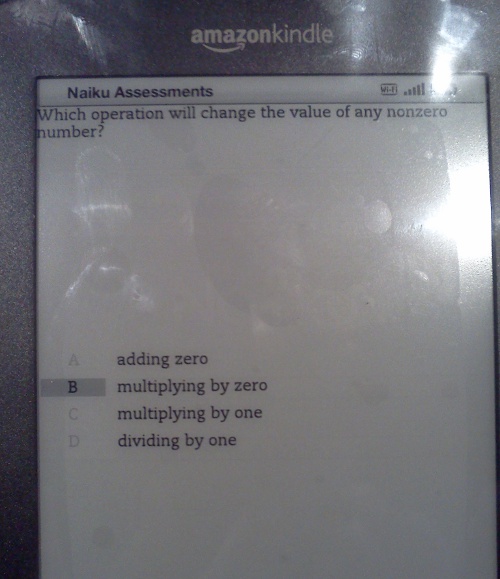
And here's a sample question, which demonstrates the "custom checkbox" widget for the multiple-choice selection. Some questions were single selection, so it had to act like a Radio Group, and other questions were multi-select, so it would have to act like a bunch of check-boxes:


Not surprisingly, the "finished app" was ridiculously small and took no time to transfer over the wireless connection. 

In the end, it was yet another great geeky experience!

Monday, November 19, 2012

How old are these songs?

I'm constantly looking for new music - the upbeat kind that gets the energy flowing for coding. I used to listen to the station "93X", but I've noticed that their song catalog is becoming increasingly antiquated.  Since that's just a guess, it seemed prudent to verify the hypothesis using a little "cloud magic".

Gathering the current song data

On the station's website, they have a "ticker" that lists the currently playing song. Using Firebug "Net" panel, it looks like the Javascript code has a timer that polls the site every 15 seconds for the current song's artist and title.  The URL request looks like this:

http://www.93x.com/jsfiles/NowPlaying.aspx?lid=5163&source=http%3A%2F%2Forigin%2Emedia%2Eradcity%2Enet%2Fkxxr%2Fnowplaying%2Fnowplaying93%2Exml&refresh=15&5927.663631614869

The response is something like this:


<!--
Cached Data


-->
<div id="nowPlayingArtist">SOUNDGARDEN</div></hr>
<div id="nowPlayingSong">BLACK HOLE SUN</div>

Yeah, that's right, it's 2012, and they're still playing "Black Hole Sun" (hey, I like the song too - but a bit less than when it was released in the early/mid 90's).

Now that we have a "easy" way of obtaining the current artist/song information, the next step is to find out the release date. Fortunately, Apple's dominance of the recorded music business comes in handy here. iTunes makes it easy to search for something - they even have a convenient API guide: http://www.apple.com/itunes/affiliates/resources/documentation/itunes-store-web-service-search-api.html 

Thus, the search URI looks something like this:  https://itunes.apple.com/search?media=music&term=SOUNDGARDEN+BLACK+HOLE+SUN

The result is a JSON array (very nice!) containing 43 matches. The hard part here is going to be finding the "correct" entry among all of the values. It seems that the "ideal" way to accomplish this is to find the object(s) which match (case insensitive!) these property values:
"trackName":"Black Hole Sun", 
"artistName":"Soundgarden", 

In this case, there's a few "correct" matches, and each has a different release date:
"releaseDate":"2010-09-28T07:00:00Z", 
"releaseDate":"1994-02-28T08:00:00Z", 

In this case, the "solution" is to simply pick the oldest release date.

Saving it for later

The next part is accumulating that information and storing (persisting) it so that an continual analysis can be performed. Otherwise, it's possible that a particular DJ may prefer the "classic" songs over the newer ones, and thus would skew the overall results.  The big question here is "what's the average age of the songs played on this station?"

Since this is being stored "in the cloud", a few options are available.

  • Google App Engine Datastore, which is effectively a key/object store. 
  • MongoDB, a document store 
  • Something relational, like AWS RDS, Microsoft SQL, or Google Cloud SQL 


For this trivial app (small amount of persistence), any of them will suffice. More on that, and the eventual code/implementation coming later.

Friday, December 9, 2011

Illumated Otto Skybot 2011

Every December, our office has an "office door decorating contest". We're asked to decorate our office door with something related to the holiday, and then all of the employees get to vote for their favorite one. Since this generally requires artistic creativity, it's rare that any of the software developers participate - much less win the contest (I think it's happened once).


A few months ago, I picked up an Arduino UNO plus an Ethernet Shield, and my addiction to digital electronics was rekindled (after a 15 year hiatus). When the annual "Decorate your Door" contest was announced, I decided that it was time to give up on "artistic creativity" and go for all-out-geek


Our company mascot is a flying robot named Otto, which seemed like the perfect target for an "upgrade" using the Arduino and a bunch of tri-colored LEDs. 


To drive the LEDs I chose the TPIC6B595 Shift Register, because a "standard" 74HC595 is limited to 70 milliamps (or so). The LEDs are the Betlux brand, and its spec sheet says that they'll happily eat 30 mA per color - which means that it can take 90 mA when they're showing the color white. That alone is enough current to fry the 74HC595. 


Since the shift-register is a "current drain", the LED's anode (ground-pin) has to be connected to the shift-register. This leaves two approaches when designing the LED driver circuit: 
  • Use common-cathode LEDs, and connect each LED-color's anode to a pin on the shift-register to "drain" the current. We'll call this the continuous-power approach. 
  • Use common-anode LEDs, and connect that common-anode to the shift-register, and then use three PNP transistors to supply current to each of the LED's color-cathodes. This means that the CPU will have to continually cycle through the three colors (showing one at a time). We'll call this the Persistence Of Vision (POV) approach.

There are pros and cons of both approaches:


Continuous Power Persistence Of Vision
Shift registers required Three: One for each LED's color-anode pin (24 total). Just one, connected to the
common-anode of each LED package.
Arduino pins needed Three: Connected to the shift-register pins SRCK, RCK, and SER_IN. Six: The same three, plus a pin to select each color (Red/Green/Blue). Technically, you could use a 74139 de-mux and get by with just 5 Arduino pins.
LED Power consumption When all 24 LEDs are lit up, 30mA * 24 = 720mA Since only 8 LEDs are lit, 30mA * 8 = 240mA
Software "complexity" Less: The Arduino only needs to transmit bits when the colors change. More: The Arduino has to constantly refresh the display, either by using a continuous loop, or a software-interrupt timer.


I opted for the power-hungry approach - that way, if the Arduino's software should happen to lock-up (unlikely, but possible), the display will continue to show the current colors. If I was going to build a bunch of these and chain them together, then I'd have to opt for the POV style.


Implementation and Construction 


The first step was to build the whole thing on the breadboard and make sure that it would actually work (yes, that's a 20 year old Jameco breadboard). I used my ammeter to measure the current coming through the LEDs and found resistor values that throttled the current to 20 mA, which helps reduce the overall power consumption (and may help extend the life of the LEDs).


Once I had the software figured out, it was time to transfer it to a real board. I have a personal preference of never soldering ICs to boards, because something inevitably happens (either while soldering or static discharge) that requires replacement of the IC. I also chose to use a 25-pin connector to attach the LED driver to the project, even though it adds a whole bunch of extra soldering, it's nice having the freedom to detach the LED driver board (and re-use it on a future project).


I took a 12x18 color printout of Otto, and started surgery with an old set of X-Acto knives. I cut out the regions that I wanted illuminated, and covered the holes with parchment paper to act as a diffuser. Six of the LEDs will reside behind the parchment paper, and the other two will be used for the eyes.


I chose the clear-package LEDs because the datasheet says that they're brighter than the clouded ones - and brighter is always better, right? Well, not really. The catch is that the clouded ones will blend colors better (when making colors like yellow). So I built a reflector assembly for the six LEDs using a paper-towel tube, a tuna-fish can, and some aluminum foil (and lots of transparent tape to prevent the foil from shorting out the leads on the LEDs).


After a few nights of late-night soldering, and then double-checking everything with my multi-meter to make sure nothing was shorted out, here's the assembled view of the completed project. (Yes, that's a cereal box.)


The Arduino is connected to the project using a 10-pin ribbon cable. I technically only needed 5 wires (+5, GND, and the 3 control-lines for the shift registers), but I wanted the possibility of having extra pins later on for future projects. In order to stack up everything, I needed an extra set of Arduino Headers due to the size of the Ethernet Shield's RJ-45 jack.


I powered up the project, ran it through the color-diagnostic test, and miraculously it actually worked! 


Public unveiling


So back to the original purpose of this project - the "Holiday Door Decoration" contest. I had to find a way to hang the whole thing on my office door (fortunately SparkFun's ribbon cable is 15 feet long). Otto looked like he needed some company, so I grabbed some construction paper and built a scene around him (like I mentioned earlier - I fall within that group of software-developers who are "artistically challenged").  


The Arduino stack is hanging on the wall behind the door. I powered it using a 1 amp iPod battery charger plugged into the Arduino's USB port, and I'm communicating to the Arduino via a very simple TCP/IP protocol that I devised (which also supports a Telnet session). 


To control the lights and colors, I send commands to the Arduino which indicate the color (red, green, or blue), and then eight bits to specify which LEDs to illuminate with that color. Here's a map that shows where the eight bits reside within the project. Thus, to illuminate the two hands in a blue color, I would send the command "b10000001".  The Arduino shifts the updated RGB bytes to the driver, and after sending the 24-bits, it triggers the RCK-pin on the shift-registers which "commits" the shifted bits.


Going one step further...


Now, having computer-controlled illumination is nice, but like the MythBusters say, "If it's worth doing, its worth overdoing!"  Since this is a holiday challenge, it needed holiday music! So I wrote up a Java program on my PC to play an MP3 file (using JMF), and simultaneously process a light-control script (text file) which contains color-bit sequences that coincide with the music. It would have been even better to use an MP3 shield, but I was running out of time before the deadline.


The light-show script is processed using a simple interpreter (also written in Java) that understands macros which are replayed some specified number of times. I'm sure a pro lighting tech could put together a more impressive lighting sequence, but as I already mentioned - I'm "artistically challenged"


I used Skybot Scheduler (yeah, shameless plug) to initiate the sound and light sequences. It also helped avoid problems with multiple people requesting songs simultaneously. I coded up a simple front-end web-page that I could display on a tablet (because anything that's "tablet enabled" makes it 10 times cooler - right?)  The web front-end uses a Perl script to kick off the predefined Skybot job. Here's a video that shows the whole thing in action.


I think next year I'll try to incorporate some laser pointers with an Arduino stepper-motor controller, but I'm open to suggestions. Throw me a comment with your ideas for next year's project!


By the way, I won the "office door decorating contest" - score one for the geeks.